
“I want to learn Cloud, but where do I even start?”
If you’ve found yourself staring at a wall of acronyms—AWS, Azure, GCP, EC2, S3, IAM—you aren’t alone. The cloud is massive, and the “analysis paralysis” that comes with choosing a first step is real. Most people think they need to start by memorizing every service a provider offers, but that’s like trying to build a house by looking at the paint colors first.
To build a career in the cloud, you need a solid foundation before you worry about the shingles. Based on industry standards and common wisdom from those already in the trenches, here is a practical, human-centered roadmap to getting your first cloud role.
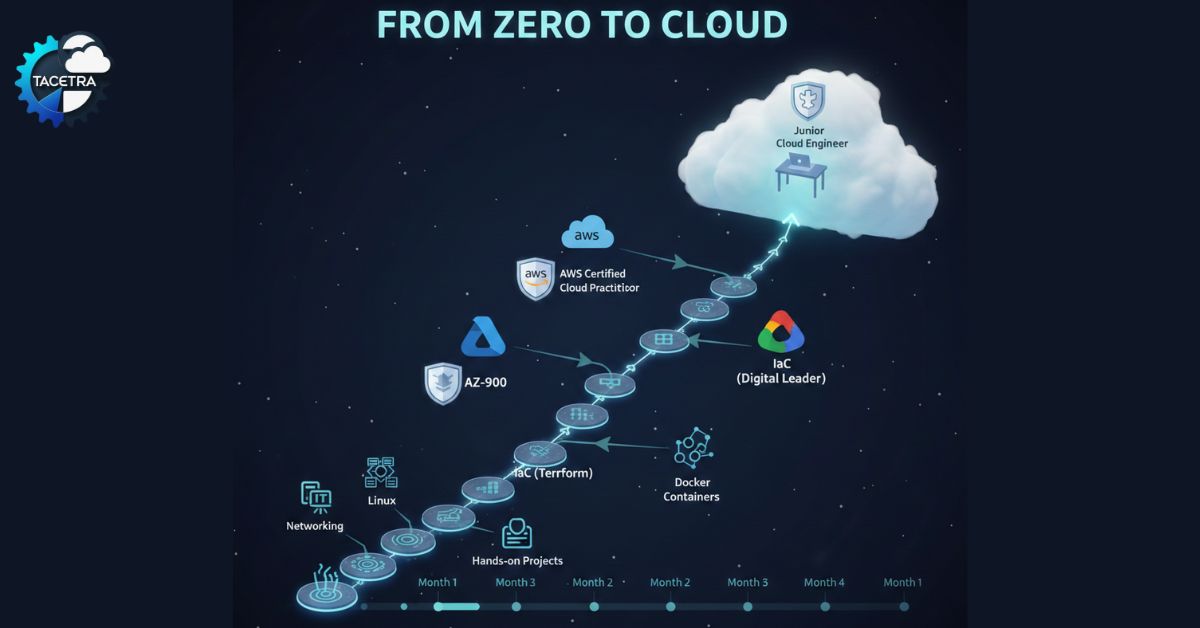
5 Step Process for Cloud Mastery
Step 1: Understanding Cloud Before Chasing Certifications
Before signing up for any exam, it helps to understand what cloud computing really is. At its core, cloud is still IT — servers, networks, storage, and security — essentially “someone else’s computer,” but to talk to that computer, you need to speak its language.
People who jump straight into advanced cloud certifications often struggle later. Without basic knowledge of networking, operating systems, and how applications run, cloud concepts feel abstract and harder to apply in real jobs.
- Networking: You don’t need to be a Cisco architect, but you must understand IP addresses, DNS, and Subnets. If you don’t know the difference between a public and private IP, a cloud Virtual Private Cloud (VPC) will feel like magic (and not the good kind).
- Linux Fundamentals: Most of the cloud runs on Linux. Spend a week getting comfortable with the command line. Learn how to move files (
mv), change permissions (chmod), and look at logs. - Practical Tip: Try installing a Linux distribution like Ubuntu on a virtual machine (using VirtualBox) at home. Try setting up a simple web server (Nginx) and accessing it from your browser.
Step 2: Choose Your Path (The Big Three)
While there are many providers, you should focus on one of the “Big Three.” Don’t try to learn them all at once; the concepts are transferable.
- AWS (Amazon Web Services): The market leader. If you want the widest job pool, start here. The AWS Certified Cloud Practitioner is the gold standard for absolute beginners.
- Microsoft Azure: The favorite for big corporate environments. If you already work with Windows or Office 365, the AZ-900 (Azure Fundamentals) is your best bet.
- Google Cloud (GCP): Known for data and AI. If you love Big Data, look at the Cloud Digital Leader or Associate Cloud Engineer.
Which one? Look at local job postings in your city. If every company near you is asking for Azure, don’t force yourself into AWS.
At this stage, the goal isn’t mastery. It’s confidence and clarity.
Step 3: The “Certification vs. Skills” Trap
Certifications like AWS Solutions Architect – Associate, Azure Administrator (AZ-104), or Google Associate Cloud Engineer introduce real-world tasks: launching virtual machines, configuring networks, managing storage, and applying security rules.
These certifications are valuable because they force you to practice inside the cloud console. You’re no longer just memorizing definitions — you’re building things. Official documentation from providers like AWS and Google Cloud becomes your best friend at this stage.
Instead of just watching videos, build something. Use the Free Tiers provided by AWS or Azure. Getting hands-on is how the cloud knowledge sticks. A certification helps your resume pass an HR filter, but it won’t pass a technical interview. You need projects.
Example Project: * Level 1: Host a static website (just a simple HTML page) on AWS S3.
- Level 2: Put that website behind a Content Delivery Network (CloudFront) and give it a custom domain.
- Level 3: Secure it with an SSL certificate.
This teaches you storage, networking, security, and DNS in one go.
Step 4: Infrastructure as Code (IaC)
In 2026, nobody “clicks” around the console to build servers anymore. We write code to do it. Learning Terraform or AWS CloudFormation is what separates a beginner from a professional.
Start by learning the basics of YAML or JSON. These are the “languages” used to describe your infrastructure. If you can write a script that automatically “spins up” a server, you are already ahead of 70% of other applicants.
Step 5: Understand Containers (Docker)
You will inevitably hear the word “Kubernetes.” Don’t start there—it’s too complex for day one. Start with Docker.
Understand how to “containerize” a simple Python application. Containers allow applications to run the same way on your laptop as they do in the cloud, solving the “it works on my machine” problem.
Pro-Tip: Set up a billing alarm (this is the first thing you should do!) so you don’t get a surprise $500 bill, and then start experimenting.
When Advanced Certifications Actually Make Sense
Professional and specialty certifications look impressive, but they’re best taken after real experience — even if that experience comes from labs and personal projects rather than a full-time job.
Advanced certifications assume you already understand architecture trade-offs, security implications, and cost management. Taking them too early can feel like memorization instead of learning. When you’ve built and broken enough systems, those advanced topics suddenly feel logical.
Suggested 6-Month Roadmap
| Timeline | Focus Area | Goal |
| Month 1 | IT Fundamentals | Learn Networking (TCP/IP) and basic Linux commands. |
| Month 2 | Cloud Basics | Pick AWS or Azure; Study for the foundational cert (CLF-C02 or AZ-900). |
| Month 3 | Hands-on Labs | Build 3 small projects using the provider’s Free Tier. |
| Month 4 | Automation | Learn Git/GitHub and basic Terraform. |
| Month 5 | Security & IAM | Understand how to lock down your account (Identity & Access Management). |
| Month 6 | Portfolio & Jobs | Document your projects on GitHub and start applying for Junior Cloud Admin roles. |
Turning Cloud Learning Into a Job Opportunity
Entry-level cloud roles rarely expect perfection. Titles like Cloud Support Associate, Junior Cloud Engineer, or Systems Administrator often act as stepping stones.
What matters most is your ability to explain what you’ve built, how you troubleshoot problems, and how you keep learning. Pair one or two certifications with real projects, and you’re already ahead of many applicants who focused only on exams.
Final Advice: Don’t Fear the “Break”
To summarize – start with fundamentals. Use certifications as guideposts, not shortcuts. Build small projects, break them, fix them, and document what you learned. That combination — not a long list of badges — is what actually opens doors in cloud careers.
Cloud engineering isn’t about knowing all the answers; it’s about knowing how to find them. Sites like Microsoft Learn and AWS Skill Builder offer incredible free modules to get you moving.
Stop planning and start clicking. The cloud is waiting.
Further Reading: Should You Bet Your Career on Oracle Cloud? AWS vs. OCI for Beginners
Discover more from TACETRA
Subscribe to get the latest posts sent to your email.
